About me: My name is Solène Rapenne, pronouns she/her. I like learning and
sharing knowledge. Hobbies: '(Reproducibility BSD OpenBSD Lisp cmdline gaming security QubesOS internet-stuff). I
love percent and lambda characters. Former Qubes OS core team member / OpenBSD developer solene@.
Contact me: solene at dataswamp dot org or
@solene@bsd.network (mastodon).
Someone told me about "data fountains" two years ago, and I wanted to try them since then. The problem is that I do not understand the theory behind them at all. So I took the lazy path and asked an LLM to write a small tool for me, then I played with it until I understood what it does in practice.
This blog post presents this small project of the day. I want to be clear from the start, this is a shitty project, it is only for educational purpose and it does not bring anything new. It was fun to do, and it helped me understand a complicated algorithm, this is all.
The project sends a file from one device to another using sound, the sender plays it through its speaker and the receiver listens with its microphone. Then I tried the same idea with animated images on a screen and a camera.
A data fountain, or fountain code, is a way to send data when the receiver cannot talk back to the sender. With sound, the transfer only goes in one direction, so the receiver cannot ask "please send me again the piece number 42, I missed it".
The sender cuts the file into small chunks, then sends packets in a loop forever, each packet being a random mix of some pieces of the file. The receiver collects any packets, in any order, and once it has a bit more packets than the number of pieces, there is a domino effect and it can rebuild the whole file. This is like filling a glass at a fountain, it does not matter which drops fall into the glass, you stop when it is full.
In practice, this means the receiver can start listening at any time, and if some noise breaks a packet, it is not a big deal, you only lose a bit of time waiting for other packets. This is important because other open source software I tried for data transfer over sound did not work at all due to noise.
I had no idea which fountain code the LLM picked, so I had to look at the code. It is a "random linear fountain code over GF(2)" as far as we can trust what is in there, but GF(2) only means that the maths are done on bits, where adding two values is a XOR.
The file is cut into blocks of 128 bytes. The first packets are simply the blocks of the file, one after the other, so a receiver listening from the start does not need any extra packet. After that, each packet is the XOR of a random selection of blocks, where each block has one chance out of two to be part of it. The selection comes from a random number generator seeded with the file identifier and the packet number, so the receiver can compute which blocks were mixed only by reading the packet header.
On the receiver side, every new packet is added to a system of equations solved with Gaussian (this reminds me a few things from school), but working on bits. When the system has enough useful packets as there are blocks, the file can be rebuilt. The project documentation says it needs about 1.6 extra packets on average, and losing 30% of the packets only makes the transfer take about 1.4 times longer.
There are more advanced fountain codes like LT codes or Raptor codes, they are faster to decode on big files, but for small files like here, this simple one does the job.
The first version was a Rust program, entirely written by an LLM in about 30 minutes, that encodes a file into sound using a data fountain. The sound uses high frequencies between 18 and 20 kHz, most adults do not hear them.
Then I added a WebAssembly module to reuse the Rust code in a web page. This way, it works everywhere without installing anything, including on smartphones. This is what the demo page uses, it also shows the link to the sources, the link to the commit used for the build and the build date.
The transfer speed is very low, about 83 bytes per second in the default mode and about 254 bytes per second in the fast mode, so this is only for very small files or some text, or you have to be very patient.
Web browsers on smartphones are very strict about giving access to the microphone. I configured my infrastructure to serve the static content with a very strict CSP header, so phones can accept to enable the microphone.
I use Caddy as a reverse proxy, which serves the static content and adds the security headers. Here is the block I added in my Caddyfile:
The CSP starts with default-src 'none' which forbids everything, then each directive allows only what the page needs from its own origin ('self'). The last three directives forbid changing the base URL of the page, sending forms and embedding the page in a frame on another website. The 'wasm-unsafe-eval' value is required for the WebAssembly module. The Permissions-Policy header allows the page to use the microphone and disables features it does not need, like geolocation, payment or USB devices. The three Cross-Origin headers prevent other websites from interacting with the page or loading its files.
I actually hate to deal with CSP headers, when enabling CSP it often breaks the website in unexpected ways and requires a few back and forth tries to fix it, but it is a valuable security mechanism if you can afford the setup.
It did not work well between my computer screen (sender) and my smartphone (receiver). I think this is because the high frequency sound does not come out of the computer speakers, but with other devices it worked fine.
To be honest, this is pretty much useless, but it is fun to see a file going through the air from a device to another without using IP protocol. Note that the transfer is not encrypted or authenticated, anyone close enough can listen to it, do not transfer your private SSH keys using it (although having someone sniffing it around is very unlikely).
After the sound, I wanted to try the same thing with images displayed on a screen and captured with a camera. I did not want to stack QR codes, there is already cimbar doing this very well. This is a great project that can reach up to 100 kB/s, but be careful if you are sensitive to epileptic seizures, the screen flashes a lot.
I gave a try a few years ago with some tool, maybe cimbar, and the setup looked like this, it was hard to get the webcam aligned with the screen and it was painfully slow, and missing one frame was enough for the system to fail.
I wanted to use a data fountain for this too (it is the same code and the same packets as for the sound), and while at it, I wanted it to look pretty and not give seizures to people.
The code for the images is in the branches explore-truchet and explore-mosaic of the git repository, I did not decide yet if I will merge them because the main target was sound. The demo website has both the sound and the images.
I tested it with my smartphone, a Logitech C920 webcam and the camera of my x390.
Some cameras worked better than others, the one of my smartphone was the best and the webcam of the X390 was the worst.
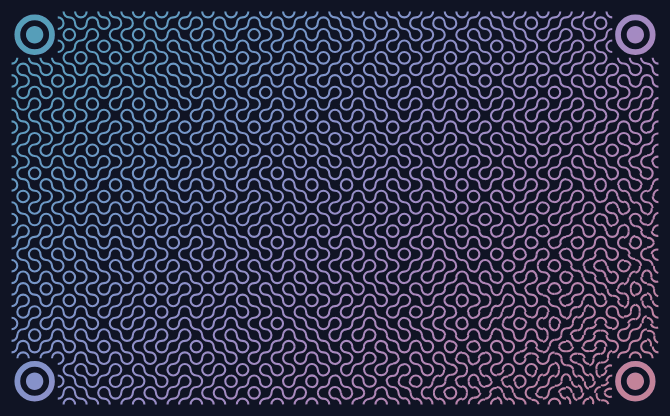
The first image implementation uses Truchet tiles. These are square tiles with a simple pattern, here two quarter-circle arcs in opposite corners, put side by side they make nice flowing curves covering the whole screen. It looks great, and carries data.
The screen shows a rectangle of 56 by 34 tiles, with a target in each corner so the receiver can find the grid in the camera picture. The orientation of each tile carries one bit, when a bit changes the tile does a quarter turn. Turning a tile does not change the amount of light it shows, so the screen never flashes, which was a goal from the start.
Then I increased the frame rate and added colors, and it still worked. Each tile can be blue or pink, which carries a second packet in each frame. The speed goes from 128 bytes per second at one frame per second, up to 1 kB/s at four frames per second with colors. This is still slow, but much faster than the sound and much more reliable.
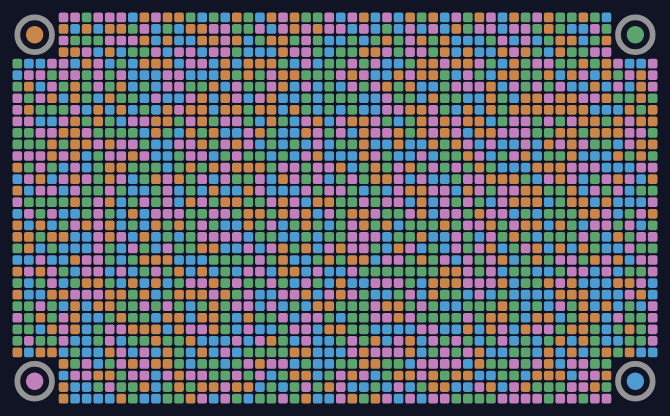
I also implemented a mosaic mode with colors, it looks like a dancefloor :D Each square of the mosaic uses one of four colors with the same brightness, so each square carries two bits. It is pretty and it sends data too, but in practice it works less well than the Truchet method.
The data is only carried by color changes, and between the rendering on the screen and what the camera captures, frames get missed. I think in an ideal setup with high end screen and camera it should work as good as the Truchet tiles.
There is nothing new here, I had fun and it helped me understand how a data fountain works without reading the maths. Seeing a file being rebuilt from random packets caught by a microphone or a camera is a good way to get the idea.
If you are curious, you can try the demo in your browser without installing anything. If this is ever useful to someone, great!