About me: My name is Solène Rapenne, pronouns she/her. I like learning and
sharing knowledge. Hobbies: '(Reproducibility BSD OpenBSD Lisp cmdline gaming security QubesOS internet-stuff). I
love percent and lambda characters. Former Qubes OS core team member / OpenBSD developer solene@.
Contact me: solene at dataswamp dot org or
@solene@bsd.network (mastodon).
For the last seven months, I spent a good part of my (small amount of) free time rebuilding my self-hosting infrastructure at home. I wanted something secure, fully automated, that updates itself and that I can rebuild from scratch if something goes wrong. Most of the ideas come from my work on infrastructures following SecNumCloud (a French security standard for cloud providers) and, to a lesser extent, ISO 27001, I wanted to see how far I could apply the same principles at home.
In this blog post, I will explain how my personal infrastructure works, how all the pieces fit together, and why I think each security layer is useful. This is not a step by step guide, I will not go deep into code, the goal is to show the architecture and the reasons behind it.
Before going further, I need to be honest, this is a personal infrastructure running on a single machine at home, and it is probably totally overengineered for most people. If you just want to host a Nextcloud for your family, a lot of what follows is not needed. But I learned a lot along the way, especially about containers and cloud-init, and I am very happy with the result :)
The hosting server is nothing special, just a regular laptop with 16 GB of RAM, a NVMe SSD and a network card, sitting next to my Internet provider box.
Everything runs on this laptop. The operating system is Incus OS, a small immutable system that only run Incus, a manager for system containers and virtual machines (it is like Proxmox but more container oriented).
On top of it, there are about twenty Ubuntu system containers, one per service, and two virtual machines for the more sensitive parts. Inside each system container, the applications themselves run as podman containers, described with "quadlets", which are files that systemd turns into services. So there are two levels of containers: Incus instances, and podman containers inside them.
I am currently hosting the following services:
Nextcloud
Forgejo, with a CI runner
Immich for photos/videos dumped from smartphones
PeerTube for videos
Vaultwarden for passwords
Kanboard
Uptime Kuma and SmokePing to monitor the network
a static website
a monitoring stack: Prometheus, Grafana, Loki, Alertmanager
CrowdSec
restic for backups
Nothing is configured by hand. Everything is declared from a git repository with OpenTofu (the open source fork of Terraform) and cloud-init (the tool that configures a cloud system at its first boot).
The system containers are unprivileged, which means the root user inside a container is not root on the host. Compared to a VM per service, this is very efficient: the RAM and disk usage are much lower, and everything is pretty fast.
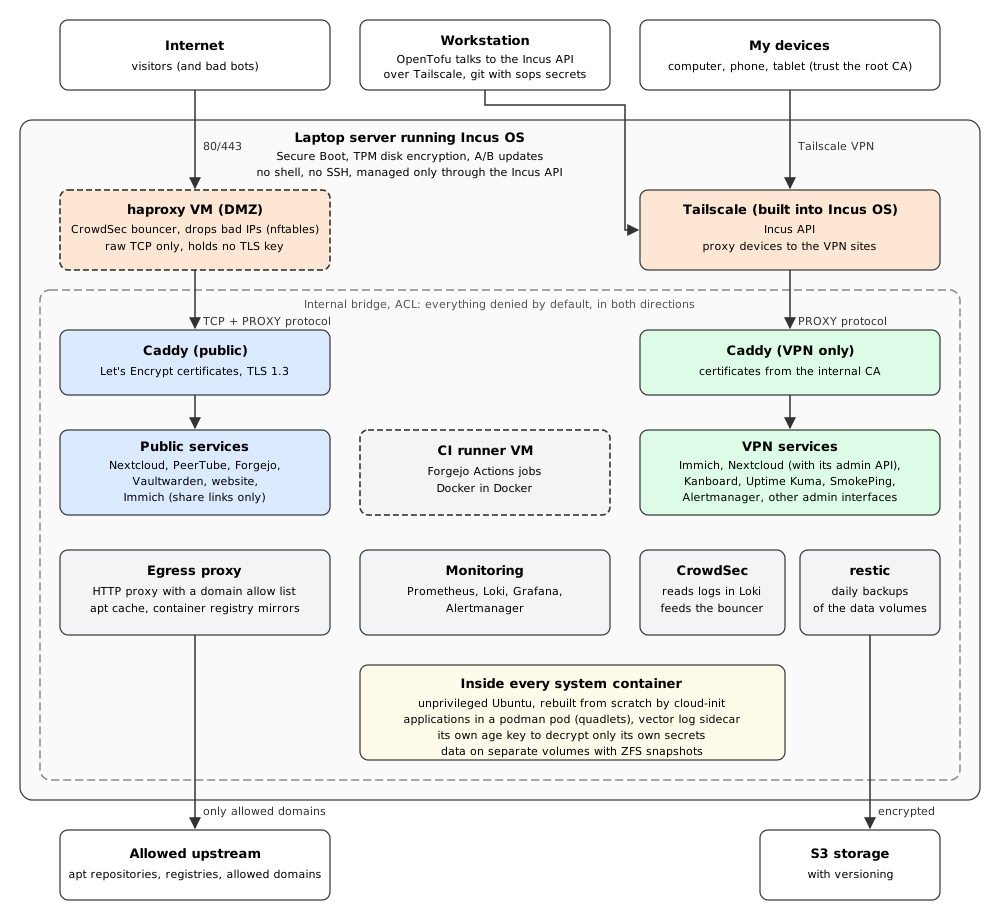
Here is a diagram of how everything fits together:
Incus OS is the foundation, I chose it because it is locked as much as possible. It comes with:
Secure Boot enabled
A/B boot: the update is written on the other partition, and the system can go back to the previous one if needed
no local access: there is no shell, no SSH, no package manager, nothing can be done with local access to the laptop
disk encryption with the TPM (this allows auto reboot without typing a passphrase, but if someone steals the laptop it will boot and they would be able to attack the system locally as if they were on my LAN)
It is not exposed on the Internet, I manage it from my LAN through the Incus API using a certificate for authentication.
An unexepcted side effect is that I do not use SSH anymore to manage the infrastructure. No SSH keys to manage, no SSH endpoint to secure, no TERM variable issue. When I need to look inside an instance, I can use incus exec to run a command or incus shell to open a shell, all through the Incus API. The only SSH in the whole setup is the git over SSH access provided by Forgejo, which is an application feature.
This is probably the part I like the most. Each instance is created from a fresh Ubuntu cloud image, and cloud-init does everything at first boot: upgrade the system, install podman, write the quadlet files, decrypt the secrets, start the services. I took inspiration from my experience with Qubes OS.
When I change anything on an instance (a configuration file, a container, a command, the order of commands), OpenTofu destroys the instance and recreates it from scratch. There is no configuration drift, what runs is exactly what is in git. If someone ever manages to get into a container and leave something behind, it disappears at the next rebuild.
Only the data persists, in dedicated Incus volumes:
a volume for podman storage, where the named volumes of the applications live
a volume for the secrets of the instance (its decryption key)
a local cache for the apt packages, to speed up rebuilds
As the system part is fully disposable, I could even replace Ubuntu with another distribution without much trouble, the applications run in podman containers anyway.
This is heavy: during a change, the component is not available for one or two minutes, the time for it to be rebuilt. But in exchange, every time I make a change, I am sure it will still work at the next boot, and I know I can rebuild the whole system if needed.
All instances are connected to an internal bridge with an Incus ACL that rejects everything by default in both directions, including between two instances. Every allowed network connection is declared in the OpenTofu code, with a description of why it exists. For example, the reverse proxies can reach the exact port of each backend, Prometheus can reach the metrics exporters, and every instance can send its logs to Loki, but Nextcloud cannot talk to Vaultwarden.
The goal is to protect the systems from each other. If one service gets compromised, the attacker should not be able to jump easily to the others.
There are two VMs for the most sensitive parts:
the haproxy VM, which is the only machine connected to the physical network and receives the Internet traffic (DMZ)
the CI runner, because CI jobs run arbitrary code, it also features Docker in Docker to run nested containers which required some privileges
The isolation of a container is a bit weaker than a VM, but it is acceptable for my threat model. For the parts most exposed to untrusted input, I preferred a hypervisor level security.
Most instances have no direct access to the Internet. A dedicated instance acts as the single exit point and provides:
an HTTP proxy with a list of allowed domains, everything else is refused (the domain list is shared by all consumers, this is acceptable here)
a caching proxy for apt packages (apt-cacher-ng)
local mirrors (pull-through caches) for the container registries I use: Docker Hub, GitHub and Codeberg
All the instances use these for their packages and container images, and the few applications that need to reach the Internet go through the filtering proxy. The few exceptions that cannot go through a proxy (for example ACME certificates for the public reverse proxy, the CI runner, the Uptime Kuma probes or the backups to S3) are explicit and documented ACL rules.
The benefit is that even if a service gets hacked, it will be complicated to exfiltrate data or download a second stage payload from an arbitrary server. Rebuilding twenty instances does not put load on the upstream mirrors or waste network bandwidth.
Internet
   |
   v
haproxy VM (CrowdSec bouncer with nftables)
   |  raw TCP + PROXY protocol
   v
caddy (public)  -->  public services
The haproxy VM only forwards raw TCP, it never sees cleartext traffic and does not hold any certificate or private key. It uses the PROXY protocol, a small header added at the beginning of the connection that carries the original client IP, so caddy knows who is really connecting, even with NAT and containers in the middle.
On the same VM, the CrowdSec firewall bouncer drops connections from IPs with a bad reputation, directly in nftables, before haproxy even accepts the connection. CrowdSec reads the logs of caddy, Forgejo and Nextcloud from Loki to detect bad behavior, and also uses community blocklists. This only works because the real client IP is known all along the way.
Then, caddy terminates TLS and forwards the requests to the services.
I discovered caddy with this project, and I find it is a great piece of software. The documentation is very good, it always had the features I needed, and the configuration is easy to understand.
There are two separate caddy instances: one for public websites, and one for the sites only reachable over my VPN. This way, even if the public caddy gets hacked, the VPN only services are not affected.
The VPN caddy only listens on the Tailscale address of the host, and also checks that the client IP is in the VPN range. The admin tools (Alertmanager, Uptime Kuma, Kanboard...) have no public endpoint at all.
Some tools are exposed on the Internet, but their admin interface or admin API is only reachable through the VPN. Even if there is a vulnerability in the admin API, this will not be exploitable. For example, Nextcloud is available both publicly and over the VPN, but its admin API is only reachable through the VPN.
Immich, which I use for photos and videos (I wrote about it this year) goes further. Publicly, it only answers to share links, so I can share content with people outside. Everything else like browsing the library or uploading photos and videos, goes through the VPN. This is a security measure, the full application is not exposed over the Internet.
For the VPN sites, I wanted real TLS certificates that are not "self signed". I run my own certificate authority (CA), which delivers certificates through ACME, the same protocol used by Let's Encrypt. Its root certificate is installed on all the instances and on the devices (phones, computers, tablets), so every component knowing this root CA recognizes the certificates. No more curl -k!
Each instance has its own age private key, generated once and stored in the volume secrets, it never leaves the server. The secrets of a service are encrypted for that instance key and for my workstation keys only. This means only the person or machine that needs to know a secret can read it: a compromised Nextcloud cannot read the Vaultwarden secrets, even with a full copy of the repository.
At boot, the secrets are decrypted on the disposable root disk, so they are regenerated at every rebuild. A git pre-commit hook running gitleaks also blocks a commit if a secret is found in the history, just in case.
Ubuntu instances use unattended-upgrades, and a full upgrade is done when the instance is created, to be sure it starts with the latest packages (I still need to figure how to upgrade the whole base image instead of upgrading it in-place)
the podman containers are updated by podman auto-update (as a service), which pulls new images for the configured tag and rolls back if the new container fails to start
I chose tags following a major version (for example postgres:18-alpine), so major upgrades are a deliberate one line change in git. So far, I never had any issue after a container updated itself automatically. I subscribed to releases RSS feeds for each project I am using, to know quickly if they are breaking changes I need to deal with or a new major version.
ZFS snapshots of the various volumes, done automatically by Incus, for a quick recovery (daily snapshots kept two weeks for the data)
restic backups of the data volumes every day to an S3 storage, encrypted on the client side
If an attacker takes control of the restic instance, they can get the access to the bucket and delete the backups. To protect against this, the bucket has versioning and protections in place, so even if the data is deleted, I can restore it during a certain number of days. The bucket is not in immutable mode though, because restic modifies files at each run and this would break it. I explained this setup in an older blog post:
In security, we often talk about three criteria: confidentiality (only the right people can read the data), integrity (the data and systems are not modified without permission) and availability (the service works when you need it). Here is how the different layers help with them in my setup.
You only see those criterias when working on certified environments, but I like how they frame the various aspects of cyber security.
CrowdSec blocks known bad IPs, weird requests and brute force attempts
automatic updates reduce the time a vulnerability stays open, this is relevant nowadays
ZFS snapshots allow a fast rollback, restic allows a full restore
the S3 versioning protects the backups against deletion
monitoring and alerts tell me quickly when something goes wrong
the whole infrastructure can be rebuilt from the repository
The main limit for availability is that everything runs on a single machine at home, if it dies or if my Internet connection goes down, everything is down. And a rebuild of the public caddy or haproxy cuts the public traffic for a minute or two. This is fine for me. Incus OS have cluster features, but this goes too far for my setup.
It was not easy, here are the biggest challenges I faced.
sops in cloud-init: sops is not packaged in distributions I wanted to use, I ended up running sops itself as a podman container to decrypt the secrets at boot
the Incus ACL: the mechanism is not always simple to understand, with everything denied in both directions, connections between two instances must be allowed on both the egress and the ingress side
the ordering done by OpenTofu: as Internet access depends on the proxy and the registry mirrors, they must be up before anything else, and for example the CrowdSec bouncer needs the CrowdSec local API to be running to start
CrowdSec in general was very complicated to get right
getting the source IP of a request with NAT and the service running in a container, this was magically solved by haproxy and the PROXY protocol, once I learned about that PROXY protocol
the layers of reverse proxies and the HTTP headers up to the final application, it was particularly hard with PeerTube and Nextcloud to get them to use the correct domain
some applications do not like to work with two differents base domains, I had to decide if they were exclusively public or exclusively on the VPN
I am very happy with this setup. It is fast, the RAM and disk usage is very efficient compared to running VMs, and everything updates automatically. Making a change through OpenTofu and cloud-init is heavier than editing a file over SSH, but it works very well, and I never have to wonder if a service will come back after a reboot, or that fear when you need to play a whole ansible playbook and you know it will go wrong.
This took me seven months of my free time, but I learned a lot about containers and cloud-init. Again, this is probably overengineered for most people, and a single server at home is not a highly available platform. But if you like the idea of disposable systems, deny by default networking and no SSH at all, I hope this post gave you some ideas.
There are still a few things I would like to improve: logging could receive some filtering because they are way too much stuff there, crowdsec could be extended with scenarios, AlertManager is not great and I still need to figure how to trigger a system container update so I don't have to use unattended-upgrades in Ubuntu anymore (that's a service running apt-get update / upgrade automatically for security updates)
If you want to play with Incus without going into Incus OS, it works as a service on any linux distribution, so you can give it a try easily.